My Antigravity CLI-based Personal Assistant
I have been using the Antigravity CLI for a while to handle a few ad-hoc tasks on my laptop. Eventually, I realized I could build a true personal AI assistant using the same harness running in the cloud. By hosting it remotely, it could be invoked from anywhere to help with my day-to-day tasks. Furthermore, with the recent availability of the Robinhood MCP server, I could leverage it to place trades on my behalf.
The Build
I started by spinning up a VM instance in Google Cloud Platform (GCP) and installing the Antigravity CLI. Then, I integrated the Robinhood MCP server with my Antigravity instance. With that, I had the barebones infrastructure ready to build an assistant powered by Gemini.
WhatsApp Gateway
While I could invoke this agent via SSH, I wanted to use
WhatsApp as my primary communication channel to interact with
the agent and receive proactive reminders. To achieve this, I
used agy to build a WhatsApp Web Gateway that
leverages headless Chromium. I assigned this service its own
dedicated phone number to communicate with the AI agent.
At a high level, the WhatsApp agent acts as a proxy to the
Antigravity CLI. It uses a SQLite-based queue and a simple
file system-based lock mechanism to manage and execute
incoming tasks sequentially. The gateway also exposes a REST
interface that the Antigravity CLI can use to send outbound
notifications. This entire gateway runs as a persistent
systemd user service, ensuring it starts
automatically on boot and recovers from crashes.
To keep it secure, the gateway only processes messages from my Whatsapp account and discards all others. The gateway can read text, download images, and interpret my reactions (emojis). It is also fully capable of sending text and images back to me.
Trading Agent
I created a trading plugin for Antigravity and defined explicit rules for executing automated trades. The agent uses the Robinhood MCP server to place trades. For now I have to distinct trading sub-agents:
Swing Trading Agent
I used Antigravity to build a python script that runs twice a
day via cron. The script queries the
"Robinhood Top 100 Popular Stocks" watchlist,
filters for stocks that match my technical criteria, gets
analysis and inputs from a virtual "investor
committee" (comprising simulated personas of Warren
Buffett, Benjamin Graham, Cathie Wood, Michael Burry, etc.),
and finally executes trades based on the aggregated advice.
These trading rules are defined in Markdown format, and I can instruct the agent to modify them dynamically via WhatsApp. Key rules include:
- Eligible Assets: Only place trades on large-cap equities (Market Cap >= $10 Billion) looking for clean daily trend lines and pullbacks.
-
Strict Guardrails: To prevent runaway
automation, the system reads safety limits defined in
AGENTS.mdand enforces them:- Sizing: Maximum position size is capped at 15% of the total portfolio value.
- Minimum Order Value: Do not execute orders valued under $200.
- Take-Profit: Scales out of positions incrementally (selling 1/3 at +20% profit and another 1/3 at +40% profit).
-
Deny List: The tickers
GOOG,GOOGL, andORCLare entirely barred from trading.
Options Wheel Agent
This agent monitors my existing portfolio and a watchlist of long-term hold stocks. It actively looks for opportunities to write covered calls and generate income. I have defined specific rules regarding option strike prices and contract durations to filter out noise, ensuring it only notifies me when a trade is worth manual execution.
Since the Robinhood MCP server doesn't support placing options trades directly, this is a notification-only agent for now.
Proactive Reminders & Notifications
While I could create a cron job for every task and reminders, I thought a simple service with scheduling capabilities and with enhancements to explictly specify the communication channel would be useful. So, I built a persistent scheduler using a SQLite database to store and manage recurring tasks and an ability to specify the output medium (WhatsApp, Email etc.).
All reminders and tasks are defined in a SQLite table with
corresponding cron expressions. The Antigravity
CLI has tools to query and manage this table, allowing me to
modify schedules directly via WhatsApp.
A system cron job runs every minute to invoke a
Python coordinator script. This script checks the SQLite
database for pending tasks and, for each one, spins up the
Antigravity CLI. Depending on the task type, the Antigravity
agent determines which tools to use to fulfill the request.
For example, when generating my daily news briefing, the agent
performs a Google Search, retrieves the articles, summarizes
the content, and formats/sends the final notification via
WhatsApp.
Mail Notifications
While WhatsApp is great for quick updates, some reports are better suited for a long-form format. For these, I integrated the Mailjet MCP server to send outbound emails.
Currently, this integration is outbound-only. However, in the future, I plan to give the agent its own inbox so I can forward emails to it. For instance, forwarding an invoice email to the agent would allow it to parse and track the bill automatically.
Automated History Compactor
I seeded the agent with basic profile details (my name, location, and occupation). However, to make the assistant feel truly personalized, it needs to learn my preferences, family details, and communication style over time.
To achieve this, I set up a scheduled job that runs hourly to
analyze recent conversation transcripts. It extracts new
personal facts, deduplicates them, and updates a
user_facts.json file. This file is injected into
the Antigravity CLI context during system initialization,
keeping the interaction history lean while maintaining
long-term memory.
My AI Assistant in action
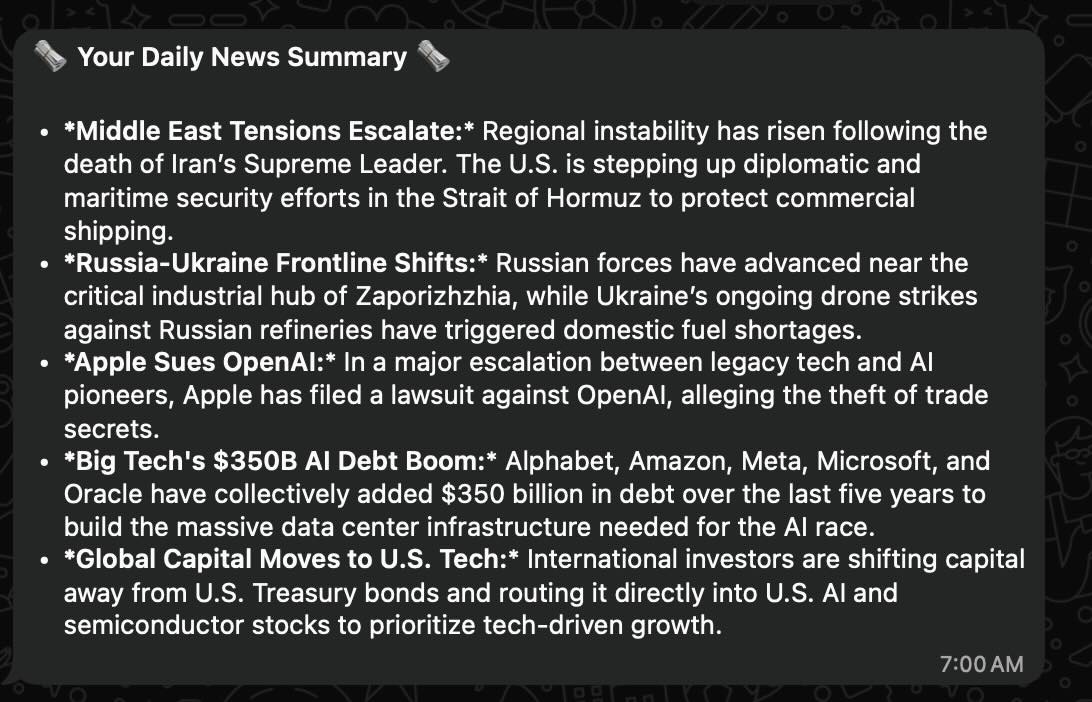
Daily News
Every morning at 7:00 AM, I get a WhatsApp notification summarizing the top stories of the day.
Trading Agent Invocation
The Automated Trading agent is invoked twice a day. It analyzes stocks that fit my criteria, executes trades, and notifies me of the actions taken.
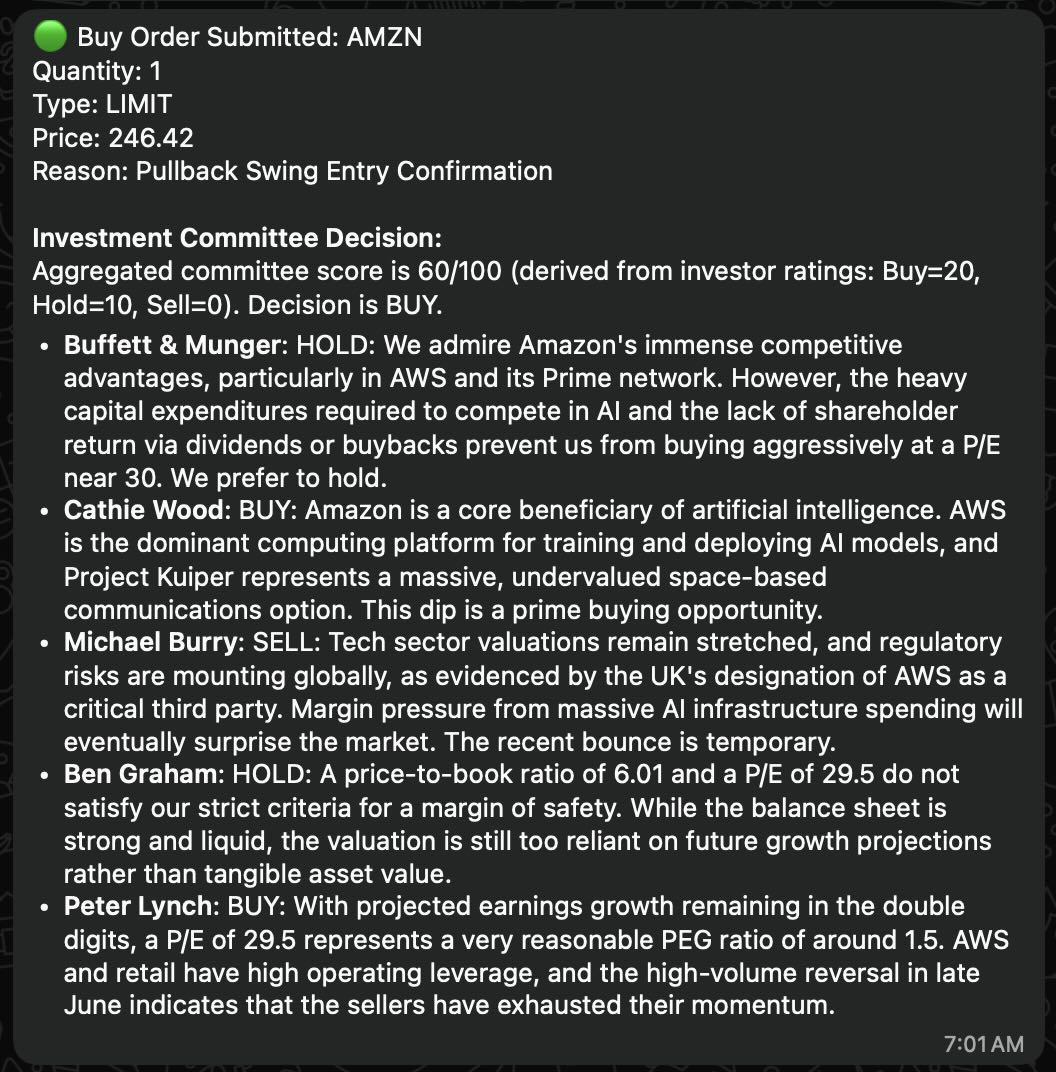
I have started the trading agent with $3000 capital and it has made $326 in the last three weeks. I did change the trading strategies a few times, started with AI stocks, enabled YOLO mode and then settled on swing trading approach on large cap stocks.
Portfolio Report
A portfolio report is sent via WhatsApp at 1:05 PM, summarizing the day's performance. Later, a detailed long-term performance report is delivered to my email.
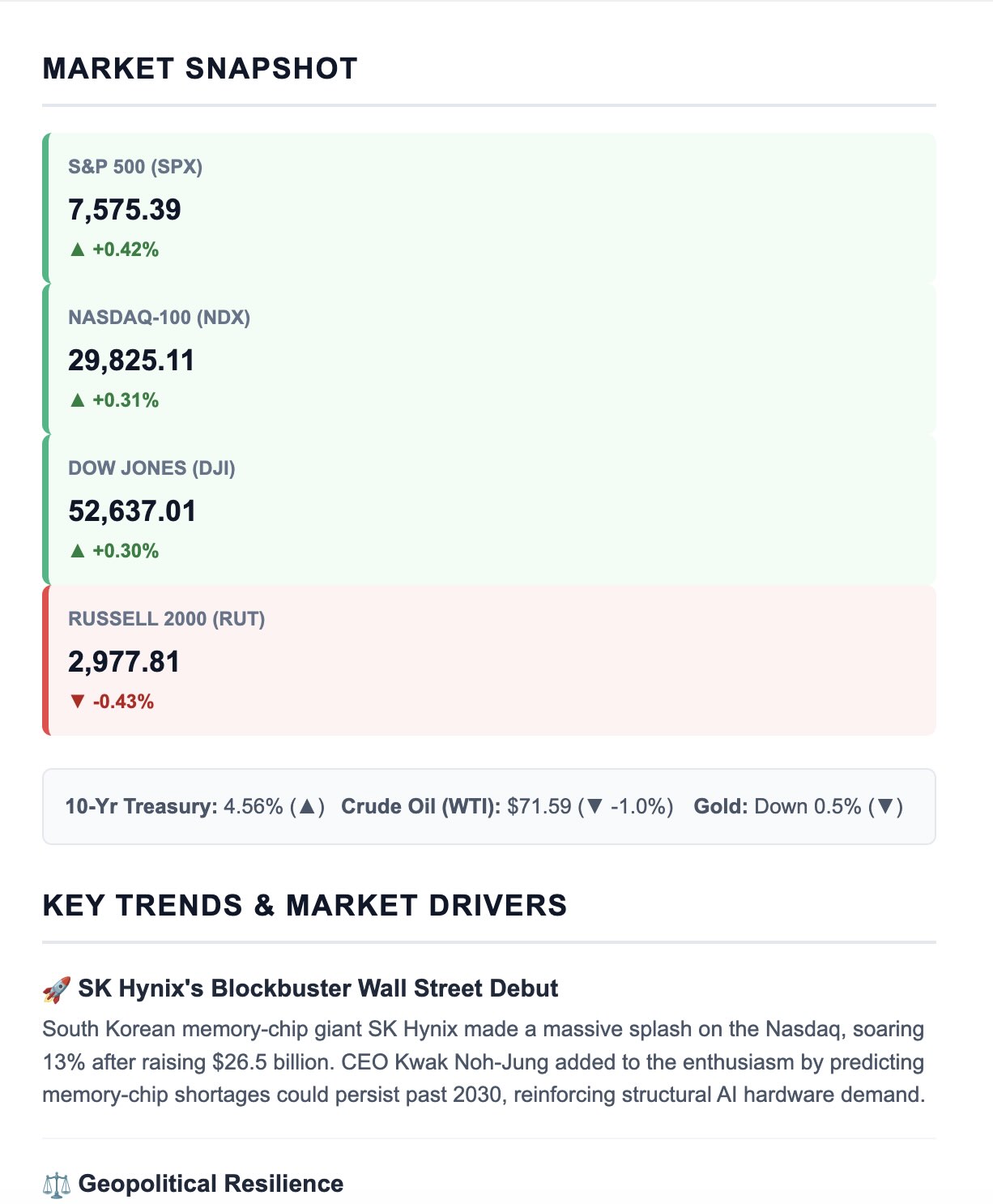
Daily Market Roundup
A market roundup is emailed to me every weekday at 4:00 PM.
Gym Reminders
I instructed the agent to send workout reminders at 4:30 PM, targeting three gym sessions a week with a rule that no two workouts can occur on consecutive days. The agent parses my replies or emoji reactions to log the workout and reschedule the remaining reminders for the week.
Gym day:

Rest day:

When I did the workout ahead of the reminder:

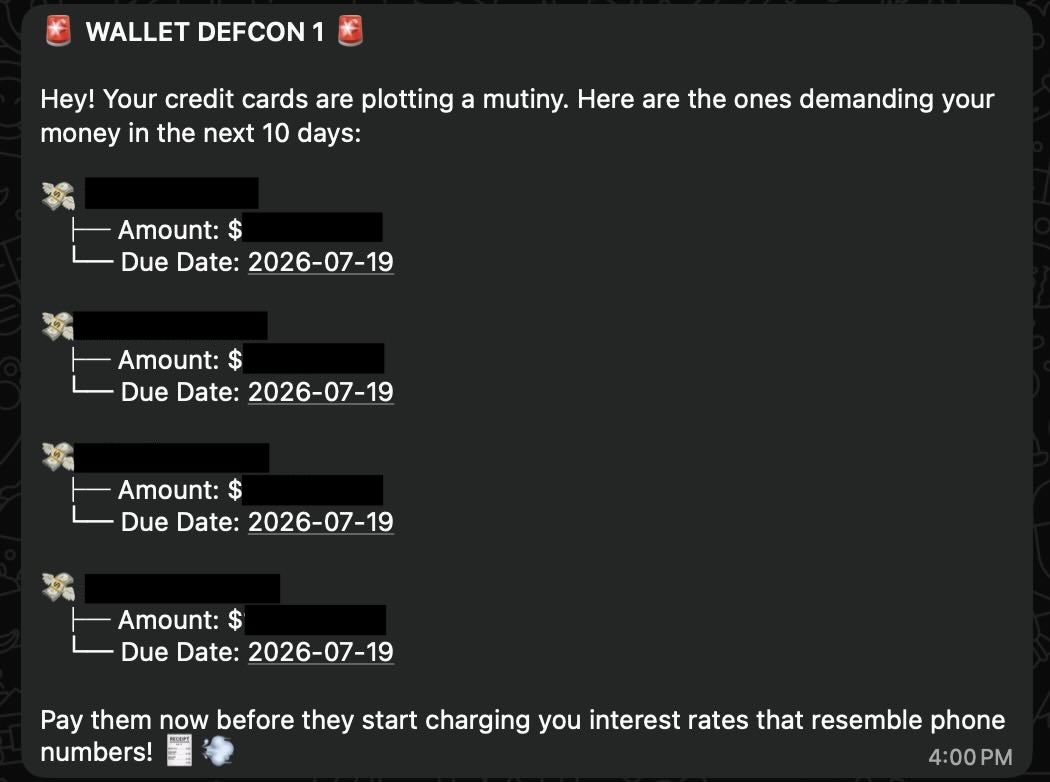
Weekend Bill Notifications
Every Saturday at 4:00 PM, the agent scans for any bills due within the next 10 days and sends a reminder.
Other Notifications
- Trash Day: Reminders sent on Sunday evenings.
- Weather Alerts: Morning alerts if rain is forecasted.
- Supplement reminders: Reminders to take vitamins and supplements at various times of the day.
- Adhoc reminders: Ability to setup adhoc one-time reminders, e.g., remind me to book airport parking before my trip, remind me to carry passports, remind me about doctor's appointments, kids activities, etc.
The Verdict
Having used this assistant for the past few weeks, the
experience has been amazing and definitely a lot of fun
building and enhancing it. The ability to converse with and
modify agents directly via WhatsApp is game-changing.
Leveraging standard tools like cron, SQLite, and
custom Python/Bash scripts alongside the MCP has proven to be
an incredibly powerful way to build tailored AI agents.
While this project was designed specifically for my personal use, I expect to enhance the agent's capabilities with more workflows as I continue to experiment with this agent.